
Icon of program: Picnic

Picnic for Mac

  • Trial version
  • 3.7
    13
  • 81.3K
  • V1.0.3
Download for Mac

View an ad to download for free

Bring your files!

Picnic is another solution to easily share files or folders between two Macs. Make sure Picnic is set up on your computers first and that your local area network is working properly.

Top Recommended Alternative

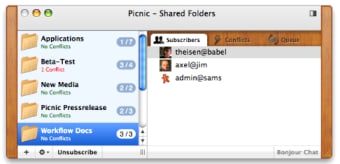
Once this is done, you'll only need to work in the Picnic interface. Press the + button at the bottom left to add new folders or files that you wish to add.

They'll all be listed on the left side of the interface. On the right, the program is neatly divided into three tabs for subscribers, conflicts and queues to monitor your synchronisation.

When you add a folder to Picnic it should appear in the Picnic folder, from where you'll be able to sync it to your other Mac.

You can effortlessly subscribe or unsubscribe to other users thanks to the button at the bottom of the interface and Picnic lets you add a password to protect your files.

Mac users will also appreciate that Picnic can sync all user accounts using Bonjour. Even though synchronizing files can bug every now and then, Picnic offers a simple, no-fuss process to transfer files on a local area network.

  • Pros

    • Sync users with Bonjour
    • Easy to select folders to share
    • Set password
    • Subscribers/conflicts/queue showed in tabs
  • Cons

    • Can crash
 0/1

App specs

  • Developer

  • License

    Trial version

  • Version

    1.0.3

  • Latest update

  • Platform

    Mac

  • OS

    Mac OS X

  • Language

    English

    Available languages

    • German
    • English
    • French
  • Downloads

    81.3K

  • Size

    3.24 MB

Program available in other languages


Icon of program: Picnic

Picnic for Mac

  • Trial version
  • 3.7
    13
  • 81.3K
  • V1.0.3
Download for Mac

View an ad to download for free


User reviews about Picnic

Have you tried Picnic? Be the first to leave your opinion!

Add review

You may also like

Alternatives to Picnic

Explore Apps

Related Articles

Latest articles

Laws concerning the use of this software vary from country to country. We do not encourage or condone the use of this program if it is in violation of these laws.
Softonic

Is Picnic safe?

100/100

Score result: Clean

This file passed a comprehensive security scan using VirusTotal technology. It is safe to download.

  • Virus free
  • Spyware free
  • Malware free
  • Verified by Security Partners

    VirusTotal logo

Scan Info

Last scan
Tuesday, April 23, 2024
Scan provider
VirusTotal · Full report

File Integrity

File
Picnic-1.0.3.dmg.gz
SHA256
df2660de7513c9ab8c81f2ad14b67a07999eed7861273c604c9d820d2e6e4755
SHA1
fdac6d423424cec9aaacbacec6f5049c1be86a2f

Softonic security commitment

Picnic has been thoroughly scanned by our advanced security systems and verified by industry-leading partners. This file comes from the official developer and has passed all our security checks, showing no signs of viruses, malware, or spyware. For more information, visit our Security and Trust Center

Signed in to Softonic as